컴포넌트 스캔과 의존관계 자동 주입 시작하기
➡️ 스프링은 설정 정보가 없어도 자동으로 스프링 빈을 등록하는 컴포넌트 스캔 기능을 제공
🔸로그를 통해 스캔 확인 가능
🔸빈 이름은 클래스명을 사용하되 맨 앞글자만 소문자를 사용 ( @Component("name")으로 이름 부여 가능)


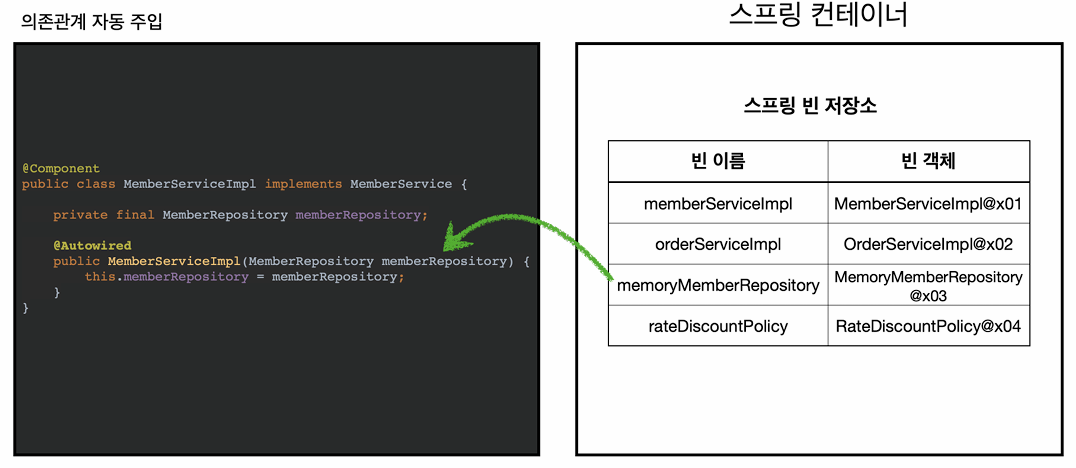
➡️ 의존관계 자동 주입 기능인 @Autowired 기능 제공
🔸@Bean을 통해 스프링 빈을 직접 일일이 등록하다보면 번거로움, 누락의 문제가 발생
🔸생성자에 @Autowired 지정하면 스프링 컨테이너가 자동으로 주입 ( getBean(MemberRepository.class)와 비슷)
package hello.core;


import org.springframework.context.annotation.ComponentScan;
import org.springframework.context.annotation.Configuration;
import org.springframework.context.annotation.FilterType;

@Configuration
@ComponentScan(     //@Component 클래스를 찾아 자동으로 스프링 빈 등록
        excludeFilters = @ComponentScan.Filter(type = FilterType.ANNOTATION, classes = Configuration.class)
        // AppConfig를 등록에서 제외시킴
)
public class AutoAppConfig {

}
@Component
public class MemberServiceImpl implements MemberService{

    private final MemberRepository memberRepository;

    @Autowired  //생성자에 Autowired 어노테이션 >> 자동으로 의존관계 주입해줌
    public MemberServiceImpl(MemberRepository memberRepository) {
        this.memberRepository = memberRepository;
        //AppConfig에서 생성하면 해당 구현체가 들어옴 (직접 구현체 설정x) >> 생성자 주입
    }
@Component
public class MemoryMemberRepository implements MemberRepository{
탐색 위치와 기본 스캔 대상
➡️ basePackages : 탐색할 패키지의 시작 위치를 지정. 지정 패키지의 하위를 모두 탐색
basePackages = "hello.core.member"
➡️ basePackageClasses : 탐색할 패키지를 지정한 클래스의 패키지로 설정
basePackageClasses = AutoAppConfig.class
➡️ 만약 아무것도 지정하지 않으면 @ComponentScan이 붙은 설정 정보 클래스의 패키지가 시작 위치로 설정
🔸권장 : 설정 정보 클래스의 위치를 프로젝트 최상단에 위치하는 방법(스프링 부트도 이 방법이 기본)
➡️ 컴포넌트 스캔의 대상 : 소스코드에 @Component 포함
🔸@Component : 컴포넌트 스캔에서 사용
🔸@Controller : 스프링 MVC 컨트롤러에서 사용
🔸@Service : 스프링 비즈니스 로직에서 사용
🔸@Repository : 스프링 데이터 접근 계층에서 사용
🔸@Configuration : 스프링 설정 정보에서 사용
🔸애노테이션이 특정 애노테이션을 들고 있는 것을 인식하는 것은 자바의 상속 개념이 아니고, 스프링이 지원하는 기능
➡️ 애노테이션 부가기능 수행
🔸@Controller : 스프링 MVC 컨트롤러로 인식
🔸@Service : 특별한 처리를 하지는 않지만 핵심 비즈니스 로직이 여기에 있다는 인식에 도움을 줌
🔸@Repository : 스프링 데이터 접근 계층으로 인식하고, 데이터 계층의 예외를 스프링 예외로 변환
🔸@Configuration : 스프링 설정 정보를 인식하고 스프링 빈이 싱글톤을 유지하도록 추가 처리 지원
필터
➡️ includeFilter : 컴포넌트 스캔 대상을 추가로 지정
➡️ excludeFilter : 컴포넌트 스캔 제외 대상을 지정
package hello.core.scan.filter;

import org.assertj.core.api.Assertions;
import org.junit.jupiter.api.Test;
import org.springframework.beans.factory.NoSuchBeanDefinitionException;
import org.springframework.context.ApplicationContext;
import org.springframework.context.annotation.AnnotationConfigApplicationContext;
import org.springframework.context.annotation.ComponentScan;
import org.springframework.context.annotation.Configuration;
import org.springframework.context.annotation.FilterType;

import static org.junit.jupiter.api.Assertions.assertThrows;
import static org.springframework.context.annotation.ComponentScan.*;

public class ComponentFilterAppConfigTest {


    @Test
    void filterScan(){
        ApplicationContext ac = new AnnotationConfigApplicationContext(ComponentFilterAppConfig.class);
        BeanA beanA = ac.getBean("beanA", BeanA.class);
        Assertions.assertThat(beanA).isNotNull();


        assertThrows(   // 필터에서 걸러졌기 때문에 예외 발생
                NoSuchBeanDefinitionException.class,
                () -> ac.getBean("beanB", BeanA.class)
        );

    }

    @Configuration
    @ComponentScan(
            includeFilters = @Filter(type = FilterType.ANNOTATION, classes = MyIncludeComponent.class),
            excludeFilters = @Filter(type = FilterType.ANNOTATION, classes = MyExcludeComponent.class)
    )
    static class ComponentFilterAppConfig{

    }
}
➡️ Filter 옵션
🔸 ANNOTATION : 기본값, 애노테이션을 인식해서 동작
🔸ASSIGNABLE_TYPE : 지정한 타입과 자식 타입을 인식해서 동작
🔸ASPECTJ : AspectJ패턴
🔸REGEX : 정규표현식
🔸CUSTOM : TypeFilter라는 인터페이스를 구현해서 처리
중복 등록과 충돌
➡️ 자동 빈 등록 vs 자동 빈 등록
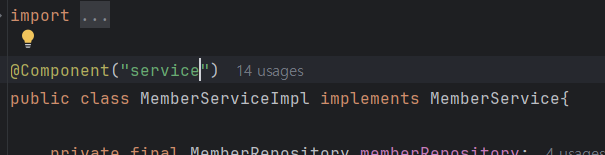
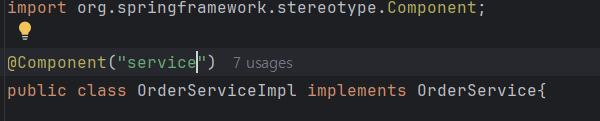
🔸자동으로 등록된 빈의 이름이 같은 경우 스프링이 오류를 발생 (ConflictingBeanDefinitionException)

➡️ 수동 빈 등록 vs 자동 빈 등록
🔸이 경우 예외x >> 수동 빈 등록이 우선권을 가짐 (오버라이딩됨)

🔸최근 스프링 부트에서는 수동 빈과 자동 빈이 충돌하면 오류가 나도록 변경(버그를 잡기 어려운 문제가 있기 때문)
🔸옵션 값을 주어 오버라이딩을 허용하도록 유도함

* 김영한님의 스프링 핵심 원리 - 기본편을 요약 및 정리한 내용입니다 *


